Should You Activate an eSIM Before Travel? When to Install
Travel eSIM basics · · Last reviewed · By SMSVault Team · 8 min read
Quick answer
For most travel eSIMs, install the profile at home or at the departure airport while you have reliable Wi-Fi, then switch the eSIM line on after you land. Installing and activating are different: some plans start counting from installation and others from the first connection, so check your plan's details before installing.
How to activate your eSIM for travel: step by step
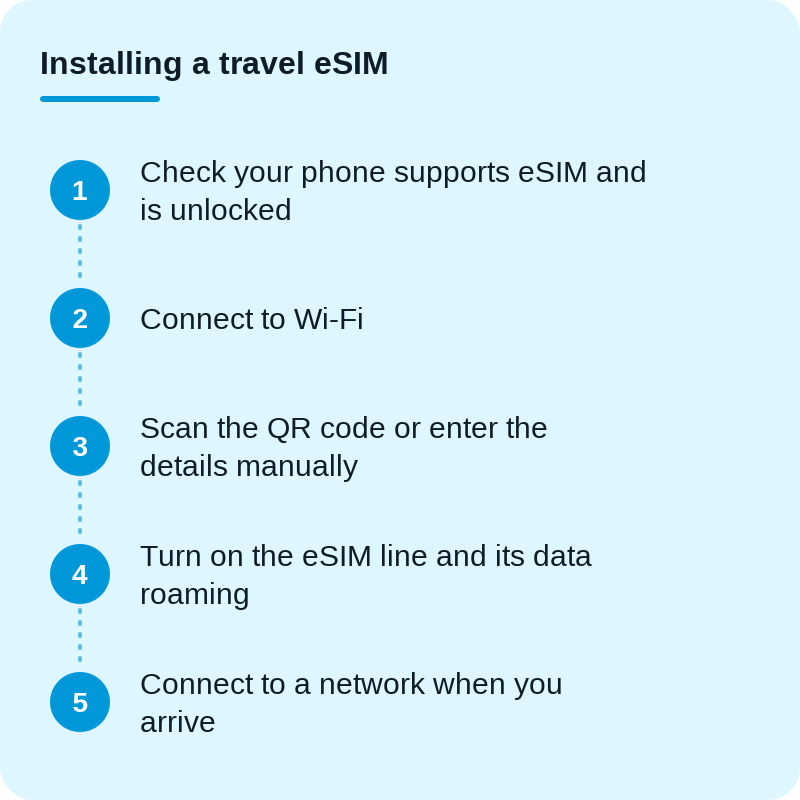
- Check your phone Make sure it is unlocked and supports eSIM (how to check eSIM support).
- Buy your plan Choose a travel eSIM plan for your destination and read when its validity period starts.
- Install before you leave Connect to Wi-Fi and scan the QR code or enter the details manually. See the step-by-step eSIM installation guide.
- Label and switch off the line Name the lines "Home" and "Travel" and keep the travel line off until you arrive.
- Switch on when you land Turn on the travel line, set it for mobile data and enable data roaming on that line only.
- Keep your home roaming off Leave data roaming off on your home SIM to avoid charges from your home carrier.
Planning an international trip involves a long checklist of tasks, from packing the right gear to ensuring your mobile data is sorted. A travel eSIM has become a favorite tool for modern explorers, offering a way to stay connected without hunting for local SIM cards or paying high roaming fees. However, one of the most common questions travelers face is exactly when to install esim profiles to ensure everything works the moment the plane touches the ground.
Timing your installation correctly can be the difference between a stress-free arrival and a frustrating search for public Wi-Fi in a foreign airport. While the technology is designed to be convenient, the sequence of activation matters. You want to avoid a situation where your data plan starts ticking down too early, but you also don't want to be stuck without a connection when you need to call a ride or check a map.
Understanding how these digital SIMs interact with your device and the local networks abroad is key. By following a few simple steps before you head to the terminal, you can ensure a seamless transition between your home network and your destination's mobile services. This guide covers the best practices for setting up your connection so you can focus on your journey.
The Ideal Time for Installation
The best time for most travelers to handle the setup is shortly before departure. Generally, installing the profile while you are still at home or at your departure airport is the safest bet. This is because the installation process requires a stable internet connection, usually via Wi-Fi, to download the necessary server configurations to your device.
Waiting until you land in a new country can be risky. Airport Wi-Fi is notoriously hit-or-miss, and some networks require a local phone number to receive a verification code just to log in. By handling the download phase in a familiar environment with a reliable connection, you eliminate the biggest hurdle to getting online.
In most cases, the travel eSIM will remain in a "waiting" or "inactive" state until it detects a compatible network in the destination country. This means you can often complete the technical setup a day or two before you leave without actually starting your data usage. It gives you peace of mind knowing the profile is ready and waiting on your device.
Tip: Always check the specific instructions provided with your purchase, as some plans might behave differently regarding when the validity period begins. Knowing the exact trigger for activation helps you manage your data budget effectively.
Understanding Activation vs Installation
It is important to distinguish between "installing" the eSIM and "activating" the plan. Installation is the act of adding the digital profile to your phone’s hardware. This can be done at any time once you have the QR code or manual entry details. Activation, however, is when the service actually starts and the clock begins on your data duration. If the QR code step is unclear, read understanding eSIM QR codes and activation.
For the majority of travel eSIMs, activation occurs only when the phone physically connects to a supported network at the destination. This is a built-in safeguard that allows travelers to prepare their devices in advance. You can see the profile in your settings, but it won't be "live" until you cross the border and turn the line on.
However, a small number of plans might activate the moment the eSIM is installed, regardless of your location. If you are unsure which type you have, it is safer to perform the installation on the day of your flight. This ensures you don't lose 24 or 48 hours of service while you are still sitting at your kitchen table.
When you are deciding when to install esim profiles, look for terms like "activation trigger" in the product description. If the plan triggers on the first connection to a roaming partner, you have much more flexibility. If it triggers upon download, wait until the last possible moment before you lose your home internet connection.
Preparing Your Device Before the Flight
Before you start the installation process, ensure your device is prepared. Your phone must be carrier-unlocked to accept an eSIM from a different provider. If your device is still under a contract or payment plan, it might be restricted to your home carrier’s network, which would prevent a travel eSIM from working.
Check your phone's settings to confirm it supports eSIM technology. Most modern smartphones produced in the last few years include this feature, but older models might not. You can usually find this information in the "About Phone" or "Cellular" section of your device settings; look for an EID number or the option to "Add eSIM."
Pre-Flight Checklist,1. Ensure your phone is fully charged before starting the installation.\n2. Connect to a fast, reliable Wi-Fi network.\n3. Take a screenshot of the QR code or print it out in case you need to scan it with the phone you are using.\n4. Confirm that your primary SIM is set to keep "Data Roaming" OFF to avoid unexpected charges from your home carrier.
Once the profile is installed, you can toggle the line to "Off" in your settings. This prevents your phone from trying to search for the new network while you are still at home, which can help save battery life. You simply switch it to "On" once the plane lands and you have reached your destination.
Handling Connectivity on Arrival
When you land, the process should be as simple as flipping a switch. Turn off Airplane Mode and go into your cellular settings. Enable the travel eSIM line and ensure that it is selected as the primary source for "Cellular Data." This tells your phone to use the travel plan for internet access rather than your home plan.
If your device allows for dual-SIM functionality, you can often keep your original number active for incoming text messages while using the travel eSIM for all data-heavy tasks. This is particularly useful if you need to receive a temporary phone number for receiving SMS verification codes while abroad. Many travelers use SMSVault to get these codes for new apps or services they sign up for during their trip.
It might take a few minutes for the eSIM to register with the local network for the first time. If it doesn't connect immediately, try restarting your phone. This often forces the device to re-scan for available towers and complete the handshake with the roaming partner. Most popular destinations are covered, so you should see a signal bar fairly quickly.
If the connection is still not working, check the "APN" settings. Most eSIMs configure these automatically, but sometimes you might need to enter them manually based on the instructions provided by your provider. Ensuring the "Data Roaming" toggle is switched ON for the travel eSIM itself is another common step that travelers sometimes overlook.
Common Pitfalls to Avoid
One of the biggest mistakes is deleting the eSIM profile if it doesn't work immediately. In almost all cases, an eSIM QR code is for one-time use only. If you delete the profile, you may not be able to reinstall it without contacting support or purchasing a new one. If you encounter issues, always try troubleshooting steps like toggling Airplane Mode or restarting before taking drastic measures.
Another error is trying to install the eSIM without an internet connection. Some travelers wait until they are in the taxi at their destination to try the setup. Without data, your phone cannot communicate with the server to download the profile. This is why the question of when to install esim is so vital—it must happen while you still have access to the web.
Lastly, be mindful of "Data Roaming" settings. You want roaming to be ON for the travel eSIM so it can connect to local partners, but OFF for your home SIM to avoid expensive fees. Mixing these up can result in a surprising bill from your home carrier when you return. Carefully labeling your SIMs in your phone settings (e.g., "Home" and "Travel") can help prevent this confusion.
Maximizing Your Travel Experience
Using an eSIM provides a level of freedom that traditional roaming simply cannot match. You get local rates and the ability to manage your data without physical hardware changes. By knowing when to install esim profiles, you secure your connection and ensure that you can navigate, translate, and communicate from the moment you arrive.
If you find yourself needing to verify accounts for local ride-sharing apps or food delivery services that aren't available in your home country, remember that you can always top up your balance with USDT on BNB Smart Chain (BEP-20) on services like SMSVault. This allows you to stay flexible and handle any digital hurdles that come your way while exploring new regions.
Safe travels involve being prepared, and your digital connection is no exception. With your eSIM installed before you leave and a clear understanding of how to switch it on, you are ready to explore the world with confidence. Simply follow the instructions, keep an eye on your data usage, and enjoy the convenience of modern connectivity.
Frequently asked questions
Ready when you are
Browse travel eSIMsArticles are for general information and are reviewed by the SMSVault team.