WhatsApp Verification Code Not Arriving: Step by Step Fixes
SMS verification & privacy · · Last updated · By SMSVault Team · 5 min read
To fix a WhatsApp verification code that is not arriving, first ensure your device has a strong cellular signal and that you have entered the phone number in the correct international format. If basic connectivity is not the issue, try restarting your device or using the "Call Me" option after the SMS timer expires to receive the code via a voice message.
Communication apps rely on SMS gateways that can sometimes experience delays due to network congestion or local carrier filters. Understanding why these barriers exist can help you navigate the setup process more efficiently, whether you are using a personal SIM or a temporary number for testing purposes.
Maintaining privacy during sign-ups is a common reason for verification hurdles. By following a structured troubleshooting approach, you can identify if the problem lies with your hardware, your service provider, or the app settings itself.
Check Device Connectivity and Network Settings
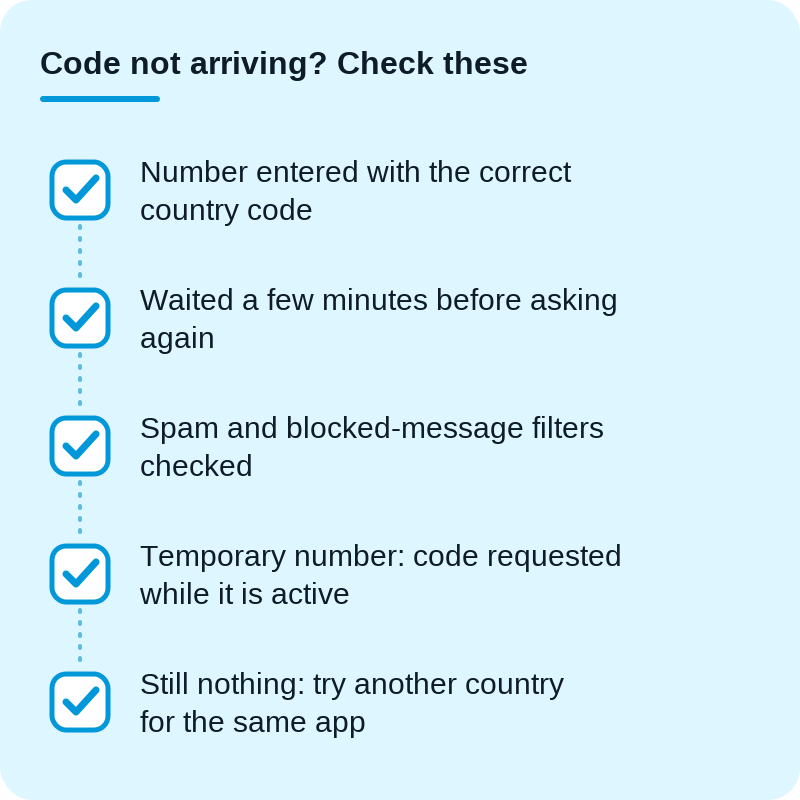
The most frequent cause for a whatsapp verification code not received is a weak or unstable mobile network connection. SMS messages require a functional cellular signal, so ensure your device is not in Airplane Mode and that you have at least a few bars of service. If you are currently using a travel data plan, remember that data-only eSIMs usually do not support incoming traditional SMS, which might be why the code is missing.
Sometimes, simply toggling your connection can refresh the link to the local tower. Turn your mobile data and cellular radio off and back on again, or restart your smartphone entirely. This often clears out minor software glitches that prevent the messaging app from processing incoming traffic.
Check your device settings to ensure that messages from unknown senders are not being automatically filtered into a junk folder or blocked. Some security apps or built-in "Do Not Disturb" modes can prevent the notification from appearing, even if the message has technically reached your device. If you are abroad, make sure you understand the nuances of receiving SMS while travelling to ensure your home carrier is allowing the transmission.
Verify Number Formatting and App Limits
Accuracy is critical when entering your digits into the registration screen. Ensure you have selected the correct country from the dropdown menu so the app applies the right country code prefix. Avoid adding leading zeros or special characters that are not part of the standard international dialing format.
If you have requested the code multiple times in a short period, the service may trigger a cooldown period. This is a security measure designed to prevent automated systems from abusing the verification flow. If you see a timer on the screen, you must wait for it to reach zero before attempting another request. Persistent attempts during a lockout period will only extend the wait time.
Tip: If the SMS remains elusive after several tries, wait for the "Call Me" button to become active. This alternative method uses a phone call to dictate the six-digit code to you. Ensure you are in a quiet place and have a pen ready to note down the numbers as they are spoken.
Using Temporary Numbers for Privacy and Testing
Many users prefer not to link their primary personal number to every digital service they use. In these cases, using a temporary phone number can be an effective way to manage privacy. At SMSVault, you can select a service and a country to obtain a temporary number specifically for receiving verification codes. This allows you to keep your main number private while still accessing the platforms you need.
When using these services, it is important to remember that the picker only displays combinations that currently pass availability checks. However, technology is not perfect, and some platforms may occasionally refuse virtual or temporary numbers based on their internal security policies. You should always follow the specific terms of service for any app you are joining.
If you choose to use a temporary number and a whatsapp verification code not received occurs, SMSVault provides an automatic refund to your balance if the message does not arrive before the number expires. This ensures you only pay for a successful verification. You can check the pricing page for current rates and any available starter credits for new accounts.
Pay with Crypto for Guest Checkout
For those who value speed and anonymity, SMSVault offers a guest checkout option. This means you do not have to go through a lengthy registration process just to get a single code. You can simply select your number and proceed to payment immediately.
The platform supports balance top-ups using various cryptocurrencies. When you reach the checkout, you will see a list of the currently available coins and networks that you can use to complete your transaction. This flexibility is ideal for users who prefer decentralized payment methods over traditional banking.
Account creation is also an option if you plan to use the service frequently. Signing up requires only an email address; you are never asked to provide your own phone number to create an account. This maintains the cycle of privacy that many users seek when testing sign-up flows or setting up new profiles.
Final Steps for Successful Verification
If you have exhausted all technical fixes and the whatsapp verification code not received issue persists, consider trying a number from a different region. Sometimes, network congestion in a specific country can delay SMS delivery globally for that prefix. Switching to a number from a different country page can often bypass these localized bottlenecks.
Always ensure you are using the official version of the app downloaded from a verified store. Third-party modifications or outdated versions of the software can have compatibility issues with modern verification protocols. Keeping your software updated is a basic but essential step in maintaining a functional digital setup.
Privacy and connectivity go hand in hand. Whether you are using a temporary number for WhatsApp or setting up a United Kingdom eSIM for an upcoming trip, being prepared for verification hurdles will save you time and frustration. If you need further assistance with your temporary number, our support resources are always available to help you navigate the process.
Frequently asked questions
Ready when you are
Get a temporary number for WhatsAppArticles are for general information and are reviewed by the SMSVault team.