Instagram Verification Code Not Received: What to Check
SMS verification & privacy · · Last updated · By SMSVault Team · 5 min read
If your Instagram verification code is not received, the most common causes are network congestion, incorrect number formatting, or security filters blocking the SMS. Checking your signal strength and ensuring your app is updated are the first steps to resolving the issue.
Many users encounter this problem when setting up a new profile or trying to regain access to an existing one. Identifying whether the fault lies with the mobile carrier, the app settings, or the phone number itself is essential for a quick fix.
Check Device and Network Settings
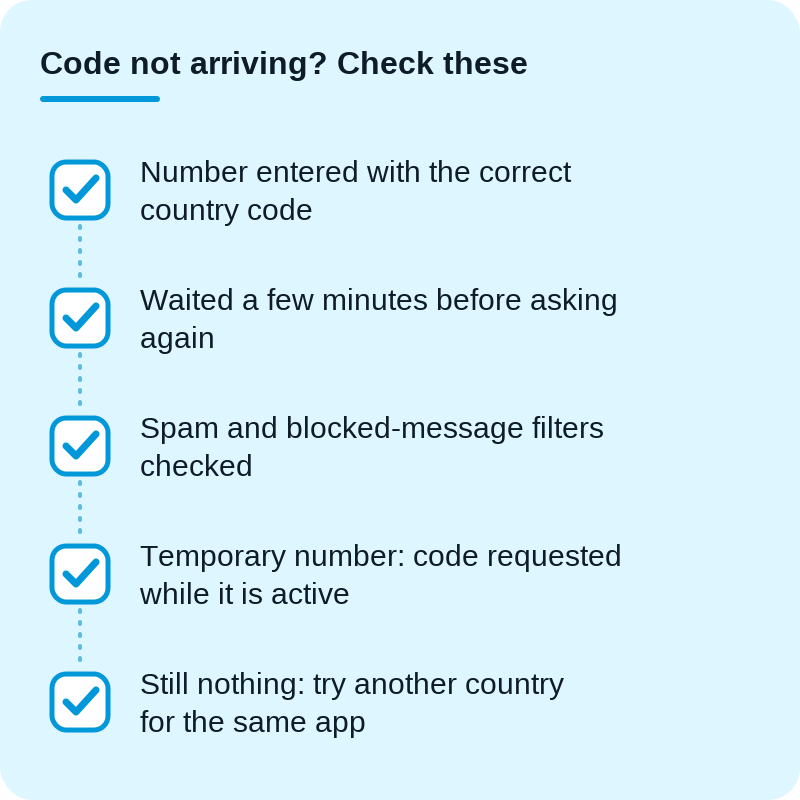
Start by confirming that your phone has a stable cellular connection. SMS messages require a functional signal, so if you are in a basement or a remote area, the message might be queued by your provider but not delivered to your handset. Switching airplane mode on and off can sometimes force a refresh of your network connection.
Ensure that you have not accidentally enabled a setting that filters messages from unknown senders. Some operating systems automatically move these texts to a junk or "other" folder, which might make it appear as though the code was never sent. If you are currently abroad, you should verify that your roaming settings are configured correctly to receive incoming texts, as discussed in this guide on receiving SMS while travelling.
Troubleshooting Steps to Try Now
- Restart your device to clear temporary software glitches.\n2. Verify that your inbox is not full, as a lack of storage can prevent new messages from arriving.\n3. Check if you have any third-party call or SMS blocking apps installed that might flag the verification number as spam.\n4. Update the Instagram app to the latest version available in your app store.
Tip: If the code does not arrive after several minutes, wait at least one hour before requesting a new one. Repeatedly hitting the "Resend" button can trigger a temporary block on your account for security reasons.
Verify Number Formatting and Service Status
Inputting the wrong country code is a frequent mistake that leads to an instagram verification code not received error. Double-check that you have selected the correct flag or country prefix in the signup menu. You should enter your phone number starting with the area code, usually omitting the leading zero if your country uses one.
It is also possible that the platform is experiencing a temporary service outage. You can check independent status websites to see if other users are reporting similar issues with delivery. In some cases, the problem is not with your phone but with the internal delivery systems the platform uses to dispatch millions of codes globally.
If you are using a temporary phone number for Instagram to protect your privacy, ensure the number is still active in your session. Some platforms may restrict certain types of virtual numbers, so it is often helpful to try a number from a different region if the first attempt fails. The SMSVault pricing page allows you to see the costs for different regions before you start a new request.
Using Temporary Numbers for Privacy
Many people prefer not to link their primary personal number to social media accounts for privacy reasons. Using a separate number can help keep your personal data off public databases and reduce the amount of marketing spam you receive on your main device. This is a common practice for developers testing SMS sign-up flows or individuals managing multiple legitimate profiles.
When you use a temporary number service, you pick a specific country and service, such as a United States mobile number, to receive your code. The system provides a number that you then enter into the app. Because some platforms have strict filters, they may occasionally refuse virtual or temporary numbers; this is a policy of the app provider and not a fault of the number itself.
SMSVault simplifies this by only displaying country and service combinations that pass current availability checks. If a code is not delivered before the number expires, the system provides an automatic refund to your balance. You can top up this balance using crypto at checkout, and guest checkout options are available if you do not wish to create a full account. Find out more about how this works in our explanation of temporary numbers.
Common Security Filters and Blocks
Social media platforms use complex algorithms to prevent automated registrations. If you are using a VPN or a public proxy while trying to verify your account, the platform might flag your connection as suspicious and refuse to send the SMS. Try disabling your VPN and using a standard mobile data or home Wi-Fi connection to see if the instagram verification code not received issue persists.
Another factor to consider is the reputation of the phone number. If a number has been previously associated with terms-of-service violations, it may be blacklisted. Using a fresh, private temporary number can often bypass these specific local carrier issues. Always ensure you are following the terms and conditions of any platform you sign up for to avoid future access problems.
If you have tried all standard fixes and still cannot receive a code, the issue may be a temporary block on your IP address. Waiting 24 to 48 hours before trying again with a different number or connection often resolves these "soft blocks." Persistence is key, but give the systems enough time to reset their security triggers between attempts.
Conclusion and Next Steps
Troubleshooting a missing verification code usually involves a mix of checking local settings and testing different connection methods. By ensuring your signal is strong, your number is formatted correctly, and your privacy settings are not interfering, you can resolve most delivery failures quickly.
If you need a secondary number for privacy or testing purposes, explore the options available on our platform. We provide a transparent system where you only pay for successful deliveries, ensuring a fair experience for all users. Select your preferred country and service to get started with a new number today.
Frequently asked questions
Ready when you are
See available numbers for InstagramArticles are for general information and are reviewed by the SMSVault team.