How to Receive SMS Online for Discord, Instagram and Google Signups
SMS verification & privacy · · Last updated · By SMSVault Team · 5 min read
You can receive SMS online for signups by using a temporary phone number service that provides short-term access to a real mobile number. This allows you to complete verification steps on platforms like Discord, Instagram, or Google without sharing your personal SIM card details.
Using a temporary number is a practical way to maintain your digital privacy while testing new apps or setting up secondary profiles for professional use. By selecting a specific country and service, you can obtain a code and finish the registration process through a web browser or app.
Why Use Temporary Numbers for Social Media and Email
Many major platforms require a phone number to verify your identity and reduce the number of automated signups. While this helps secure the platform, it often forces users to give up their personal contact information, which might be used for marketing or tracking across different services. Using a temporary number provides a layer of separation between your real identity and the digital account you are creating.
Privacy is a significant factor for people who want to keep their primary phone number out of public databases. By choosing to receive sms online for signups, you ensure that your personal device remains free from unsolicited marketing messages or potential data leaks associated with the service you are joining. This is especially useful for those who manage multiple projects and need distinct accounts for each.
Additionally, temporary numbers are beneficial for developers and testers who need to verify that their application's registration flow works correctly in different regions. Instead of buying physical SIM cards for every country, you can simply use a virtual interface to check if the SMS triggers as expected. Check the current pricing to see how this fits into your testing budget.
Setting Up Discord with a Temporary Number
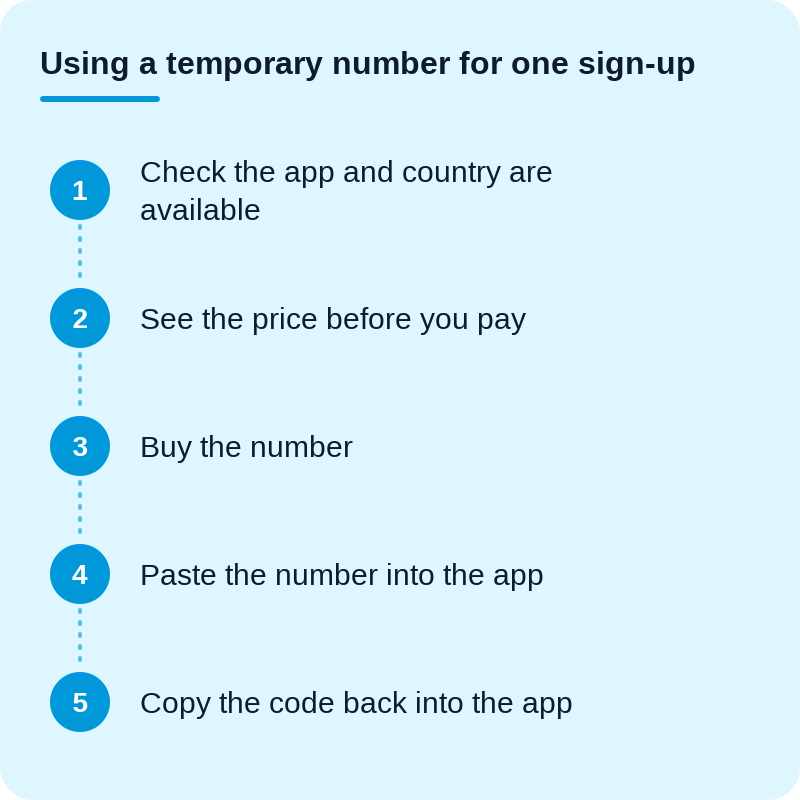
When you create a profile on Discord, the platform may ask for a phone number to unlock certain server features or to verify your account. To use a temporary number, you first select the Discord service page and pick a country that you want the number to originate from. The system will then provide a number for you to enter into the Discord interface.
Once you enter the number, wait for the platform to send the verification code. You will see the incoming message appear in your SMSVault dashboard. It is important to note that some platforms may flag certain numbers as virtual, so if one does not work, the automated refund system allows you to try a different one. Always ensure you are following the community guidelines of the platform you are joining.
Tip: Make sure you have the signup page open and ready before requesting your temporary number, as these numbers are usually active for a limited window of time. If you need to understand more about how these numbers function, you can read our guide on [understanding temporary phone numbers for SMS verification](/blog/understanding-temporary-phone-numbers-for-sms-verification).
Verifying Instagram and Google Accounts
Google and Instagram have robust security systems that frequently request phone verification during the signup process or when logging in from a new location. For an Instagram account, you can follow a similar process by selecting a number from a country where you want your account presence to be localized. This helps in maintaining a professional or hobbyist account without linking it to your personal lifestyle.
For a Google account, phone verification is often a mandatory step to prevent automated registrations. Using a temporary number can help you set up a workspace or a backup email address for specific tasks. Simply copy the number provided into the Google signup form and wait for the numeric code to appear in your SMSVault history.
Keep in mind that Google and Instagram may have different policies regarding virtual numbers. If a specific country's number is not accepted, you can try another region. The number picker only shows combinations that have passed recent availability checks, which helps improve the likelihood of a successful signup. Success depends heavily on the platform's current security filters.
Managing Your SMSVault Balance and Privacy
One of the benefits of using SMSVault is the flexibility in how you manage your balance. You can top up your account using various cryptocurrencies, which adds another layer of privacy to your transactions. The checkout process will show you the currently supported coins and networks. If you are new, check the pricing page for any current starter credit offers for new email signups.
You do not need to provide a personal phone number to create an SMSVault account; an email address is sufficient. For those who prefer even more anonymity, guest checkout is available, allowing you to get a number without a long-term account commitment. This is a great way to receive sms online for signups without leaving a large digital footprint.
If you are traveling and need data while you manage your accounts, you might also consider looking at travel eSIM data plans. These allow you to stay connected to the internet in various countries without relying on expensive roaming. You can even stay online in the United Kingdom or other regions while managing your verification codes.
Troubleshooting and Best Practices
Sometimes an SMS might not arrive due to network congestion or the platform's internal filters. If the timer expires and no code has been received, SMSVault automatically refunds the cost of that number to your balance. This allows you to try again with a different number or a different country without losing your funds. You can find more details on this in the refund policy.
It is best to avoid using free public numbers found on the internet for sensitive signups. Public numbers are often blocked by major platforms because thousands of people have already tried to use them. Using a private temporary number ensures that you are the only one receiving the message during that window, which is much safer for account security. Read more about free vs private temporary numbers to understand the risks.
Always remember that these numbers are temporary. If you plan to use an account for many years, you should consider setting up secondary recovery methods, such as an authenticator app or backup codes. Temporary numbers are perfect for the initial verification, but long-term access should be secured through the platform's recommended security settings. Follow the specific terms of service for every app you register with to ensure your account remains in good standing.
Frequently asked questions
Ready when you are
See available numbers for this serviceArticles are for general information and are reviewed by the SMSVault team.