Discord Phone Verification Not Working: Causes and Fixes
SMS verification & privacy · · Last updated · By SMSVault Team · 5 min read
Discord phone verification issues are typically caused by network delays, the use of unsupported VOIP numbers, or regional carrier filters that block short-code messages. You can usually resolve this by checking your signal strength, ensuring you aren't using a blocked number type, or trying a private temporary number from a different region.
Verification is a security step many platforms use to confirm a user is a real person and to protect the community. However, technical glitches can occur at several points between the service sending the code and your device receiving it. Understanding the common points of failure helps you troubleshoot the problem effectively without getting locked out of your account.
Common Reasons for Verification Delays
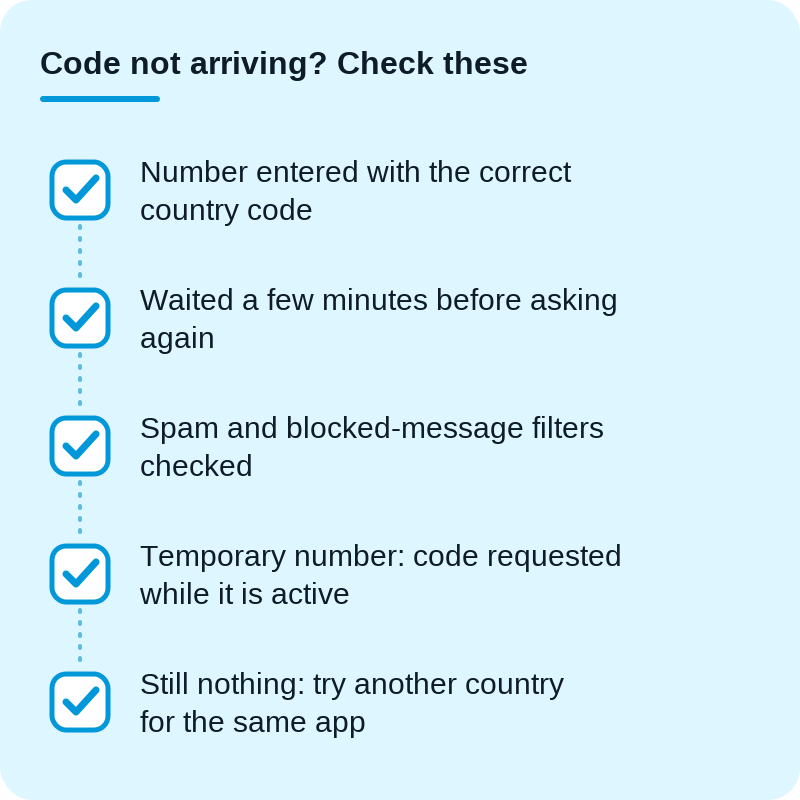
The most frequent reason for a code not arriving is a simple delay in the mobile network. SMS messages used for verification often travel through different gateways than standard person-to-person texts. If these gateways are congested, the code might take several minutes to arrive, or it might time out entirely. It is best to wait at least five minutes before requesting a second code to avoid triggering a temporary block for making too many requests.
Your device settings can also play a role in blocking these messages. Check if you have any third-party apps installed that filter "spam" or unknown senders, as these often mistake automated verification codes for marketing fluff. Additionally, ensure your phone is not in Do Not Disturb mode or Airplane mode, and that you have a stable cellular connection. Wi-Fi alone is often not enough to receive traditional cellular SMS.
Tip: If you are traveling and unable to receive texts on your home SIM, you might find it easier to [receive SMS abroad](/blog/receive-sms-abroad-how-to-get-verification-codes-while-travelling) by using a dedicated temporary number service rather than relying on expensive and often unreliable roaming connections.
Understanding Invalid Number Errors
If the app tells you your number is invalid, it is likely because the number is flagged as a VOIP (Voice over IP) or landline number. Many large platforms require a "mobile" classification for security purposes. Even if you have a legitimate contract, some virtual carriers or smaller providers are categorized as VOIP in global databases, which can lead to automatic rejection during the signup process.
Another possibility is that the number has already been linked to a different account. Most services only allow one account per phone number to prevent duplicate profiles. If you recently acquired your number, a previous owner might have used it for the same service. In these cases, you may need to contact the platform's support team or use a different, clean number to complete your registration.
For those who prefer not to share their primary contact details for privacy reasons, understanding temporary phone numbers can be helpful. These numbers provide a way to receive a single code for a specific service without exposing your permanent personal data to the platform's database.
Troubleshooting Network and Regional Issues
Geography can sometimes be a barrier to successful verification. Some mobile carriers in specific countries have strict filters on international SMS traffic. If the service is sending the code from a server in a different country, your local provider might block it before it ever reaches your handset. This is particularly common in regions with high levels of telecommunications regulation.
If you are experiencing persistent issues, try switching between cellular data and Wi-Fi, or vice-versa. Sometimes the app’s internal logic for sending the verification request works better on one type of connection. You should also ensure the app itself is updated to the latest version, as older versions may have bugs in the verification flow that have since been patched.
When local numbers are failing consistently, you can look at available numbers for this service from other countries. Using a number from a region with more robust roaming agreements can sometimes bypass the delivery issues you face with a local SIM card. Always check the pricing page first to see the current rates for different geographic locations.
Using SMSVault for Verification Codes
SMSVault offers a practical solution when your personal number is not working or when you want to maintain your privacy. You can select a specific service and a country to get a temporary number. The system is designed to only show combinations that have a high likelihood of success based on current availability checks. This makes it a reliable tool for testing sign-up flows or setting up an account while traveling.
The process is straightforward: you choose your service, pay using the available crypto options, and the number is provided to you instantly. You then enter this number into the app's verification field. If for any reason the SMS does not arrive before the number's timer runs out, the system provides an automatic refund to your balance. You can then use that balance to try a number from a different country or a different carrier.
It is important to remember that some apps are very restrictive and may still reject certain temporary or virtual numbers. This is why the refund policy is in place. For more details on how the system handles failed deliveries, you can review the guide on receiving codes online. We recommend always following the terms of service of any platform you join to ensure your account remains in good standing.
Final Steps and Success Tips hearth
If you have tried multiple numbers and still cannot verify, the issue might be related to your IP address or browser fingerprint. Platforms sometimes flag certain internet connections if they appear suspicious. Try clearing your browser cache and cookies, or try the verification process on a different device entirely. Small changes in your digital environment can often resolve stubborn technical hurdles.
In summary, most verification failures are the result of technical mismatches between your carrier and the service provider. By methodically checking your device settings, understanding number classifications, and using temporary numbers when necessary, you can usually overcome these obstacles. Always ensure you are using a stable connection and have patience with the delivery process.
For more information on managing your digital presence and protecting your personal data, explore our other guides on privacy habits. If you are ready to try a new number, head to our main picker to see what is currently available for your needs.
Frequently asked questions
Ready when you are
See available numbers for DiscordArticles are for general information and are reviewed by the SMSVault team.